THE TAKE
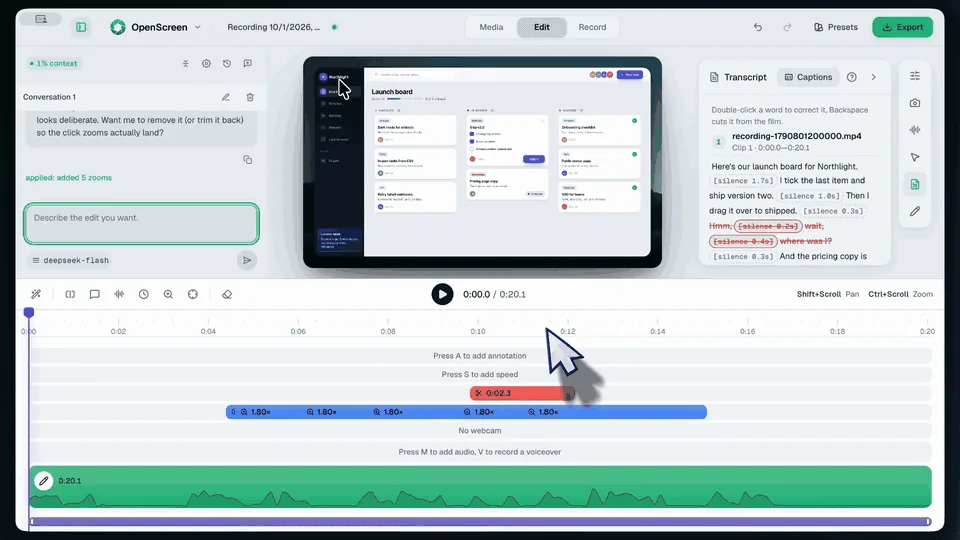
OpenScreen records your whole screen or a single window, along with your microphone, system audio and an optional webcam overlay. Stop recording and the editor opens with zooms already placed on the moments you clicked, a smoothed cursor and a background behind your capture, so the demo looks finished on the first take.
Captions are transcribed on your own computer, and you can edit the video like text: delete a word or a silence from the transcript and it’s cut from the timeline. Add text, arrows and images, change the speed of any segment, and export MP4 or GIF in several aspect ratios, encoded on the GPU. An optional AI assistant applies the edits you describe using your own API key, and a headless CLI lets scripts and AI agents record and render.
OpenScreen is free for personal and commercial use, with no watermark, no account and nothing behind a paywall. It’s open source under the MIT license. Siddharth Vaddem created it, and development continues in the getopenscreen project with the original creator’s approval.
HIGHLIGHTS
- Automatic zooms from your clicks
- Smooth cursor & webcam overlay
- Edit by transcript
- On-device captions
- GPU-accelerated export
- Open source (MIT)
Loading the conversation…